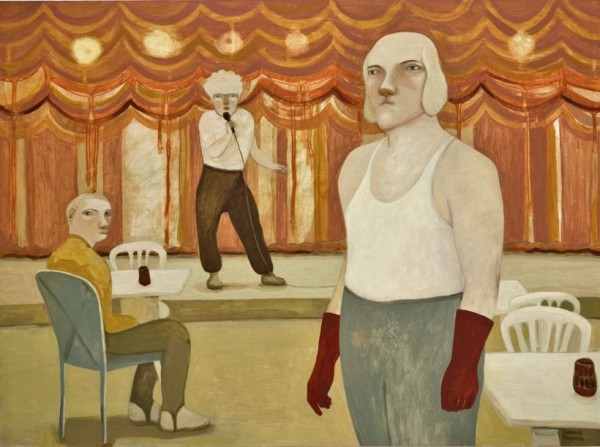
Conheci a pintora e ilustradora sueca Camilla Engman daquele jeito que a gente conhece as coisas na internet: não faço a mínima ideia. Fiquei encantada com a estranheza das pinturas, com pessoas aparentemente melancólicas ou confusas, em situações misteriosas e quase sempre em florestas (esse fator em especial me conquistou, já que adoro as paisagens nórdicas).
Fui acompanhando o trabalho dela ao longo dos anos, o que foi interessante por ver algumas pequenas mudanças. Os cenários foram mudando, saindo das florestas e natureza para lugares fechados, mais urbanos. Os personagens foram ganhando uma pegada circense, o que deixou tudo ainda mais esquisito e misterioso. As cores, tons terrosos, muitos beges e verdes e alguns vermelhos pontuais, continuaram. A combinação de cores, inclusive, é uma das coisas que gosto na Camilla Engman.
Esse negócio de acompanhar o trabalho de artista por um tempo faz você acabar se apegando, como se conhecesse a pessoa. Quando a Morran, cachorra da Camilla, morreu, eu dei uma choradinha. E sei que tem gente em outras partes do mundo que fez isso também (que loucura, internet!). Tanto que ela fez o The Morran Book Project, com ilustrações de 236 pessoas em homenagem à cachorrinha. É clara a influência da Morran no trabalho dela.
É curioso que, apesar dessa estranheza nas pinturas, as ilustrações dela são leves, fofinhas e engraçadinhas. O personagem Mr. Mustache é meu favorito, olha ele aqui de cuequinha:
Você pode saber mais da Camilla Engman no site e no blog dela. E pode comprar coisinhas na loja dela, Studio Morran (aceito presentes).
Conheci a pintora e ilustradora sueca Camilla Engman daquele jeito que a gente conhece as coisas na internet: não faço a mínima ideia. Fiquei encantada com a estranheza das pinturas, com pessoas aparentemente melancólicas ou confusas, em situações misteriosas e quase sempre em florestas (esse fator em especial me conquistou, já que adoro as paisagens nórdicas).
Fui acompanhando o trabalho dela ao longo dos anos, o que foi interessante por ver algumas pequenas mudanças. Os cenários foram mudando, saindo das florestas e natureza para lugares fechados, mais urbanos. Os personagens foram ganhando uma pegada circense, o que deixou tudo ainda mais esquisito e misterioso. As cores, tons terrosos, muitos beges e verdes e alguns vermelhos pontuais, continuaram. A combinação de cores, inclusive, é uma das coisas que gosto na Camilla Engman.
Esse negócio de acompanhar o trabalho de artista por um tempo faz você acabar se apegando, como se conhecesse a pessoa. Quando a Morran, cachorra da Camilla, morreu, eu dei uma choradinha. E sei que tem gente em outras partes do mundo que fez isso também (que loucura, internet!). Tanto que ela fez o The Morran Book Project, com ilustrações de 236 pessoas em homenagem à cachorrinha. É clara a influência da Morran no trabalho dela.
É curioso que, apesar dessa estranheza nas pinturas, as ilustrações dela são leves, fofinhas e engraçadinhas. O personagem Mr. Mustache é meu favorito, olha ele aqui de cuequinha:
Você pode saber mais da Camilla Engman no site e no blog dela. E pode comprar coisinhas na loja dela, Studio Morran (aceito presentes).
Conheci a pintora e ilustradora sueca Camilla Engman daquele jeito que a gente conhece as coisas na internet: não faço a mínima ideia. Fiquei encantada com a estranheza das pinturas, com pessoas aparentemente melancólicas ou confusas, em situações misteriosas e quase sempre em florestas (esse fator em especial me conquistou, já que adoro as paisagens nórdicas).
Fui acompanhando o trabalho dela ao longo dos anos, o que foi interessante por ver algumas pequenas mudanças. Os cenários foram mudando, saindo das florestas e natureza para lugares fechados, mais urbanos. Os personagens foram ganhando uma pegada circense, o que deixou tudo ainda mais esquisito e misterioso. As cores, tons terrosos, muitos beges e verdes e alguns vermelhos pontuais, continuaram. A combinação de cores, inclusive, é uma das coisas que gosto na Camilla Engman.
Esse negócio de acompanhar o trabalho de artista por um tempo faz você acabar se apegando, como se conhecesse a pessoa. Quando a Morran, cachorra da Camilla, morreu, eu dei uma choradinha. E sei que tem gente em outras partes do mundo que fez isso também (que loucura, internet!). Tanto que ela fez o The Morran Book Project, com ilustrações de 236 pessoas em homenagem à cachorrinha. É clara a influência da Morran no trabalho dela.
É curioso que, apesar dessa estranheza nas pinturas, as ilustrações dela são leves, fofinhas e engraçadinhas. O personagem Mr. Mustache é meu favorito, olha ele aqui de cuequinha:
Você pode saber mais da Camilla Engman no site e no blog dela. E pode comprar coisinhas na loja dela, Studio Morran (aceito presentes).
Conheci a pintora e ilustradora sueca Camilla Engman daquele jeito que a gente conhece as coisas na internet: não faço a mínima ideia. Fiquei encantada com a estranheza das pinturas, com pessoas aparentemente melancólicas ou confusas, em situações misteriosas e quase sempre em florestas (esse fator em especial me conquistou, já que adoro as paisagens nórdicas).
Fui acompanhando o trabalho dela ao longo dos anos, o que foi interessante por ver algumas pequenas mudanças. Os cenários foram mudando, saindo das florestas e natureza para lugares fechados, mais urbanos. Os personagens foram ganhando uma pegada circense, o que deixou tudo ainda mais esquisito e misterioso. As cores, tons terrosos, muitos beges e verdes e alguns vermelhos pontuais, continuaram. A combinação de cores, inclusive, é uma das coisas que gosto na Camilla Engman.
Esse negócio de acompanhar o trabalho de artista por um tempo faz você acabar se apegando, como se conhecesse a pessoa. Quando a Morran, cachorra da Camilla, morreu, eu dei uma choradinha. E sei que tem gente em outras partes do mundo que fez isso também (que loucura, internet!). Tanto que ela fez o The Morran Book Project, com ilustrações de 236 pessoas em homenagem à cachorrinha. É clara a influência da Morran no trabalho dela.
É curioso que, apesar dessa estranheza nas pinturas, as ilustrações dela são leves, fofinhas e engraçadinhas. O personagem Mr. Mustache é meu favorito, olha ele aqui de cuequinha:
Você pode saber mais da Camilla Engman no site e no blog dela. E pode comprar coisinhas na loja dela, Studio Morran (aceito presentes).
Conheci a pintora e ilustradora sueca Camilla Engman daquele jeito que a gente conhece as coisas na internet: não faço a mínima ideia. Fiquei encantada com a estranheza das pinturas, com pessoas aparentemente melancólicas ou confusas, em situações misteriosas e quase sempre em florestas (esse fator em especial me conquistou, já que adoro as paisagens nórdicas).
Fui acompanhando o trabalho dela ao longo dos anos, o que foi interessante por ver algumas pequenas mudanças. Os cenários foram mudando, saindo das florestas e natureza para lugares fechados, mais urbanos. Os personagens foram ganhando uma pegada circense, o que deixou tudo ainda mais esquisito e misterioso. As cores, tons terrosos, muitos beges e verdes e alguns vermelhos pontuais, continuaram. A combinação de cores, inclusive, é uma das coisas que gosto na Camilla Engman.
Esse negócio de acompanhar o trabalho de artista por um tempo faz você acabar se apegando, como se conhecesse a pessoa. Quando a Morran, cachorra da Camilla, morreu, eu dei uma choradinha. E sei que tem gente em outras partes do mundo que fez isso também (que loucura, internet!). Tanto que ela fez o The Morran Book Project, com ilustrações de 236 pessoas em homenagem à cachorrinha. É clara a influência da Morran no trabalho dela.
É curioso que, apesar dessa estranheza nas pinturas, as ilustrações dela são leves, fofinhas e engraçadinhas. O personagem Mr. Mustache é meu favorito, olha ele aqui de cuequinha:
Você pode saber mais da Camilla Engman no site e no blog dela. E pode comprar coisinhas na loja dela, Studio Morran (aceito presentes).